# Prompt Engineering
When we give instructions like "summarize this email" or "give me key takeaways," we leave room for interpretation which can lead to hallucinations [2].
SOLUTION: We can use JSON or Markdown prompts to get consistent outputs.

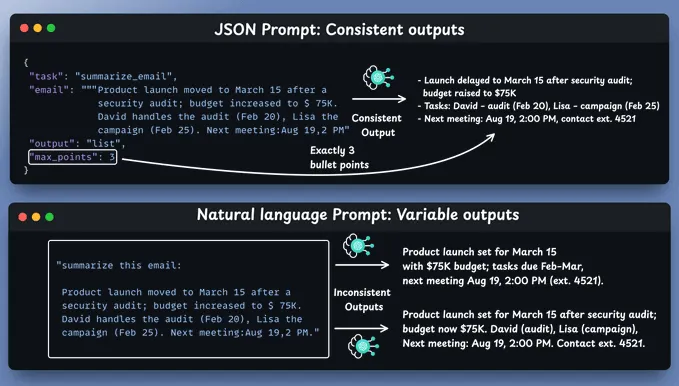
The reason JSON is so effective is that AI models are trained on massive amounts of structured data from APIs and web applications.
JSON prompts ensure a consistent structure every time regardless of what we are doing: generating content, reports, or insights.
Many models excel at other formats:
- Claude handles XML exceptionally well
- Markdown provides structure without overhead
It is mainly about structure rather than syntax.
In fact, Markdown often requires fewer tokens which saves money.
## Prompt Examples
Here is a simple JSON prompt example [2]:
```json
{
"task": "Summarize",
"format": "bullet points",
"tone": "professional",
"length": "3 key takeaways"
}
```
Here is a Markdown prompt example [2]:
```md
# Task
Provide details for each movie
## Movies
- Inception
- The Matrix
- Interstellar
## Output Format
- Title:
- Director:
- Year:
- IMDB Rating:
```
## Tips for Better Prompts
Here are some tips for creating better prompts [1].
The job is to frame the task:
1. Who is it? (the role)
2. What is the goal? (the deliverable)
3. What is the plan? (the steps)
4. What are the rules? (the constraints and examples)
5. How do we check it? (the verification)
### Cheatsheet
R-G-S-R-V = Role, Goal, Steps, Rules, Verification
1) ROLE: “You are a {role} for {audience}.”
2) GOAL: “Produce {deliverable} that achieves {outcome}.”
3) STEPS: “Show the plan first, wait for OK.”
4) RULES: “Format {X}; tone {Y}; limits {Z}; cite sources.”
5) VERIFY: “Add tests/checklist/acceptance criteria.”
Starter prompt:
```txt
You are a {role}. Audience: {who}.
Goal: {deliverable}. Success looks like {DoD}.
First: outline your plan (bullets). Wait for my OK.
Constraints: {tone, length, format, must/never}.
Verification: include {tests|citations|examples}.
```
### 1. Role prompts that actually narrow the space
Why it works: Roles anchor style, scope, and criteria — the model stops guessing.
Here is a sample template:
```txt
You are a {role}. Audience: {who}.
Goal: {what outcome looks like}.
Constraints: {tone, reading level, format, must/never}.
Use {n} bullets and {m} examples.
```
Examples
- You are a clarity editor for busy founders. Audience: non-technical. Goal: a 120-word summary with 3 actionable takeaways. Constraints: plain English, no jargon, numbered bullets.”
- You are a Python mentor. Goal: explain this bug and propose a minimal fix. Constraints: show the diff, then 3 tests.
### 2. Break big asks into stages (and change the hat each time)
Complex requests get shallow answers because the model spreads its effort too thin.
Here is the recommended 3-Stage pattern [1]:
1. Researcher: list the sub-topics and unknowns
2. Planner: produce the outline or algorithm
3. Producer: write/code only after the plan is approved
Here is a sample prompt chain [1]:
```txt
Step 1 — Researcher:
List key topics, edge cases, and success criteria for {task}.
Return as a checklist.
Step 2 — Planner:
Using the checklist, draft a step-by-step plan with time/complexity notes.
Step 3 — Producer:
Create the deliverable following the plan. Include {tests|citations|examples}.
```
### 3. Reasoning with structure (without rambling)
Since “think step by step” often spills paragraphs, it is better to shape the reasoning format [1].
```md
Provide:
- Assumptions (3 bullets)
- Options (A/B/C, 1 line each)
- Decision (choose 1 + why in ≤3 bullets)
- Next actions (3 bullets with owners)
```
```json
For the analysis, output JSON with keys:
{ "assumptions":[], "risks":[], "next_steps":[] }
```
### 4. Branch before you bet (multi-path thinking)
Avoid overconfident one-shot answers. It is better to for parallel options and a short vote [1].
```txt
Give 3 distinct approaches to {problem}.
For each: 1-line idea, 2 pros, 2 cons, rough effort (S/M/L).
Then pick one and justify in ≤4 bullets.
```
### 5. ReAct: reason, then act (great for analysis or refactoring)
Force the model to outline its steps before touching content.
```txt
Task: {task}.
First: list the steps you will take.
Wait for my “OK” before executing.
```
Then reply “OK” (or adjust the steps) and let the model proceed.
### 6. Build alignment before execution
Avoid the desire to jump straight to production. It is better to ask the model to echo your constraints [1].
```txt
You are a {role}.
Summarize your understanding of my goal, audience, constraints, and done-definition.
Ask 3 clarifying questions, then pause.
```
Fix misalignment early and pay less later.
### 7. Beat the “agreeableness” bias
LLMs default to agreeable, so it is better to invite dissent [1].
```txt
I might be wrong. Propose an alternative explanation and say what evidence would change your mind.
Answer the question, then write a “Disagreeing view” in 3 bullets.
```
This reduces hallucinations and surfaces edge cases.
### 8. Manage the context window like a pro
The model only “sees” what fits in the window, so we need to be intentional [1].
- Front-load constraints: role, audience, format
- Attach skimmed context, not full dumps (summaries beat raw walls of text)
- Reset the chat for new tasks (fresh context = fewer biases)
- Pin a brief: keep a 10-line project brief you can paste to every new thread
Here is a brief example:
```txt
Project: {name}
Audience: {who}
Tone: {plain/warm/technical}
Sources: {links or short notes}
Forbidden: {jargon, claims without sources, etc.}
Definition of Done: {testable outcome}
```
### 9. Lazy prompting (when it helps)
Sometimes the best approach is to let the model propose the plan [1].
```txt
Outcome: {goal}. Constraints: {hard limits}.
Propose 2–3 solid options to achieve this.
Ask me exactly the info you need to execute one option.
```
This technique can be used to begin a task when we are unsure of the path.
### 10. Translate domains, generate analogies, and re-frame
Models are outstanding at domain translation and analogies [1].
```txt
Explain {topic} to {audience} using an analogy from {domain}.
Give 5 analogies for {concept}, each 1 sentence, different domains.
Rewrite this for {role}: {ctO|designer|lawyer}. Keep the meaning, change the lens.
```
### Advanced prompts
A) Socratic Mode (learn by questions)
```txt
Socratic Coach:
Do not give the answer. Ask me 5 progressive questions that reveal the key idea behind {topic}.
After each answer, adjust the next question.
End with a 3-bullet summary of what I’ve learned.
```
B) Debugging with discipline
```txt
You are a Python debugging assistant.
Input: error message + minimal code.
Return:
1) Likely root-cause (≤3 bullets)
2) Minimal repro (≤15 lines)
3) Minimal fix (diff)
4) 3 unit tests
If unsure, say what data you still need.
```
C) Factual answers with receipts
```txt
Task: answer the question with citations.
Rules: cite exact lines from provided sources like [1], [2]; if missing, say “insufficient context”.
Format:
- Answer (≤120 words)
- Sources: [n] file:line
```
D) Writing with voice control
```txt
Role: clarity editor.
Goal: rewrite the text at Grade 8, keep technical correctness.
Format: 3 versions — “plain”, “persuasive”, “playful”.
```
E) Decision memo template
```txt
Role: product lead.
Write a 1-page decision memo for {decision}.
Sections: context (5 lines), options (A/B/C), risks (3 bullets), decision, next steps (owners/dates).
```
### Guardrails that save messy outputs
- Word limits per section stop rambling
- Tabular or JSON output makes results reusable
- Disallow lists you don’t need (e.g., “no more than 3 bullets”)
- “If unsure, say so” and “propose what to check next” encourages honesty
- Ask for tests or examples to force precision
### Troubleshooting: when outputs go sideways
- Too generic? Tighten the role and audience; add negative examples (“avoid buzzwords”).
- Verbose? Add section caps and max word counts.
- Hallucinations? Require citations or source quotes; allow “insufficient info.”
- Off-topic? Start a fresh thread; paste a concise brief first.
- Stuck? Use “Branch before you bet” to surface alternatives.
Here some methods and techniques to improve prompt engineering for LLM applications.
## Ensure output consistency
Here some methods and techniques to improve prompt engineering for LLM applications [4]:
### Markup tags
We can use a technique in which LLM answers are enclosed in markup tags to ensure output consistency.
```py
prompt = f"""
Classify the text into "Cat" or "Dog"
Provide your response in <answer> </answer> tags
"""
```
Now we can easily parse out the response using the following code:
```py
def _parse_response(response: str):
return response.split("<answer>")[1].split("</answer>")[0]
```
The reason that markup tags works so well is that this is how the model is trained to behave.
When OpenAI, Google, and others train the models, they use markup tags. Therefore, the models are very effective at utilizing these tags and will usually adhere to the expected response format.
We can also make use of markup tags elsewhere in our prompts.
Here we provide few shot examples to a model, we can do the following:
```py
prompt = f"""
Classify the text into "Cat" or "Dog"
Provide your response in <answer> </answer> tags
<example>
This is an image showing a cat -> <answer>Cat</answer>
</example>
<example>
This is an image showing a dog -> <answer>Dog</answer>
</example>
"""
```
### Output validation
We can use Pydantic to validate the output of an LLM. We can define types and validate the output of the model.
### Handling errors
Errors are inevitable when dealing with LLMs.
Therefore, it is important to use the following techniques to handle errors:
- Retry mechanism with exponential backoff
- Increase the temperature
- Have backup LLMs
## The prompt as documentation
Should a developer include the original AI prompt as a comment block above a set of classes?
This may be the start of a new documentation practice that could fundamentally change how we understand and maintain AI-assisted codebases.

## References
[1]: [Stop Wasting Chats: Prompt Like a Pro (2026 Field Guide for ChatGPT, LLMs & Prompt Engineering)](https://pub.towardsai.net/stop-wasting-chats-prompt-like-a-pro-2026-field-guide-for-chatgpt-llms-prompt-engineering-5f12d128d7bd)
[2]: [JSON prompting for LLMs](https://blog.dailydoseofds.com/p/json-prompting-for-llms)
[3]: [The prompt as documentation: Should AI-generated code include its origin story?](https://bartwullems.blogspot.com/2025/09/the-prompt-as-documentation-should-ai.html?ref=dailydev&m=1)
[4]: [How to Ensure Reliability in LLM Applications](https://towardsdatascience.com/how-to-ensure-reliability-in-llm-applications/)
----------
[Prompt Engineering Templates That Work: 7 Copy-Paste Recipes for LLMs](https://www.kdnuggets.com/prompt-engineering-templates-that-work-7-copy-paste-recipes-for-llms)
[JSON prompting for LLMs](https://blog.dailydoseofds.com/p/json-prompting-for-llms?utm_campaign=post&utm_medium=web)
[Stop Wasting Chats: Prompt Like a Pro (2026 Field Guide for ChatGPT, LLMs & Prompt Engineering)](https://pub.towardsai.net/stop-wasting-chats-prompt-like-a-pro-2026-field-guide-for-chatgpt-llms-prompt-engineering-5f12d128d7bd)
[DSPy: The framework for programming—not prompting—language models](https://github.com/stanfordnlp/dspy)
[Generating Structured Outputs from LLMs](https://towardsdatascience.com/generating-structured-outputs-from-llms/)
[The prompt as documentation: Should AI-generated code include its origin story?](;https://bartwullems.blogspot.com/2025/09/the-prompt-as-documentation-should-ai.html)