# Python File Formats
Here we cover some choices for Python and Pandas file formats.
## Best Format for Pandas Data
The article [1] provides a small comparison of various ways to serialize a pandas data frame to the persistent storage.
When the number of observations in your dataset is high, the process of saving and loading data back into the memory becomes slower, and now each kernel’s restart steals your time and forces you to wait until the data reloads. Thus, the CSV files or any other plain-text formats lose their attractiveness.
THe article goes through several methods to save pandas.DataFrame onto disk to see which one is better in terms of I/O speed, consumed memory, and disk space.
### Formats to Compare
We consider the following formats to store our data:
- Plain-text CSV — a good old friend of a data scientist
- Pickle — a Python’s way to serialize things
- MessagePack — it’s like JSON but fast and small
- HDF5 —a file format designed to store and organize large amounts of data
- Feather — a fast, lightweight, and easy-to-use binary file format for storing data frames
- Parquet — an Apache Hadoop’s columnar storage format
All of these formats are widely used and (except for MessagePack) often encountered in practice.
### Chosen Metrics
In order to determine the best buffer format to store the data between notebook sessions, the following metrics were chosen for comparison:
- size_mb: the size of the file (in Mb) with the serialized data frame
- save_time: an amount of time required to save a data frame onto a disk
- load_time: an amount of time needed to load the previously dumped data frame into memory
- save_ram_delta_mb: the maximal memory consumption growth during a data frame saving process
- load_ram_delta_mb: the maximal memory consumption growth during a data frame loading process
Note that the last two metrics become important when we use efficiently compressed binary data formats such as Parquet which could help to estimate the amount of RAM required to load the serialized data, in addition to the data size itself.
It seems that feather format is an ideal candidate to store the data between Jupyter sessions. It shows high I/O speed, does not take too much memory on the disk, and does not need any unpacking when loaded back into RAM.
This comparison does not imply that you should use this format in every possible case. For example, the feather format is not expected to be used as a long-term file storage. Also, it does not take into account all possible situations when other formats could perform better.
### Better Data Formats
The CSV file format has been commonly used as data storage in many Python projects because of its simplicity. However, it is large and slow!
By its nature as a text file, CSV takes larger disk space and longer loading time => Lower Performance. In this article, two better-curated data formats (Parquet and Feather) have been proved to outperform CSV in every way [Reading time, Writing time, Disk storage] as shown in the
Figure: Overview Performance of CSV | Parquet | Feather
Figure: Storage Comparison — CSV | Parquet | Feather
### Setup
```py
import numpy as np
import pandas as pd
import feather
import pickle
import pyarrow as pa
import pyarrow.orc as orc
from fastavro import writer, reader, parse_schema
np.random.seed = 42
df_size = 10_000_000
df = pd.DataFrame({
'a': np.random.rand(df_size),
'b': np.random.rand(df_size),
'c': np.random.rand(df_size),
'd': np.random.rand(df_size),
'e': np.random.rand(df_size)
})
df.head()
```
### Parquet vs Feather
- Feather appears to have a slightly better reading/writing performance when using Google Colab.
- Feather has better performance with Solid State Drive (SSD).
- Parquet has better reading performance when read from the network.
- Parquet has better interoperability with the Hadoop system.
Use Feather if your project is mainly on Python or R (not integrated with Hadoop) and has SSD as data storage. Otherwise, use Parquet.
Using Parquet or Feather formats in Python significantly improves data writing, reading, and data storage performance.
### Parquet Format
Parquet is a column-oriented data file format that provides efficient data compression and encoding schemes with enhanced performance to handle complex data in bulk. It was first developed and used in the Apache Hadoop ecosystem. Later, it was adopted by Apache Spark and widely used by cloud vendors like Amazon, Google, and Microsoft for data warehousing.
In Python, the Pandas module has natively supported Parquet, so you can directly integrate the use of Parquet in your project, as in an example below.
```py
# import module
import pandas as pd
# read parquet file as df
df = pd.read_parquet('<filename>.parquet')
# do something with df ...
# write df as parquet file
df.to_parquet(‘name.parquet’)
```
### Feather Format
Feather was developed using Apache Arrow for fast, interoperable frame storage.
Pandas now supports Feather format natively (starting with version 1.1.0).
We can read/write a Feather file format the same way as CSV/Parquet.
```py
# import module
import pandas as pd
# read feather file as df
df = pd.read_feather('<filename>.feather')
# do something with df ...
# write df as feather file
df = pd.to_feather('<filename>.feather')
```
## Top Five Alternatives to CSV
The article [2] discusses five alternatives to CSV for data storage:
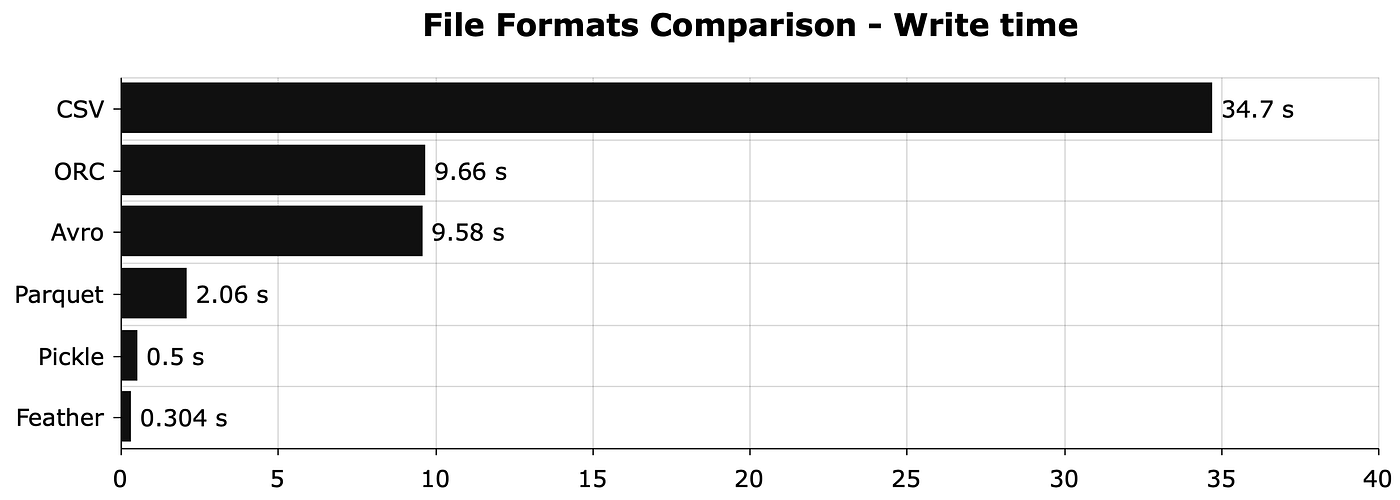
The difference in write times is very interesting. Pretty much any format will have much faster write time than CSV.
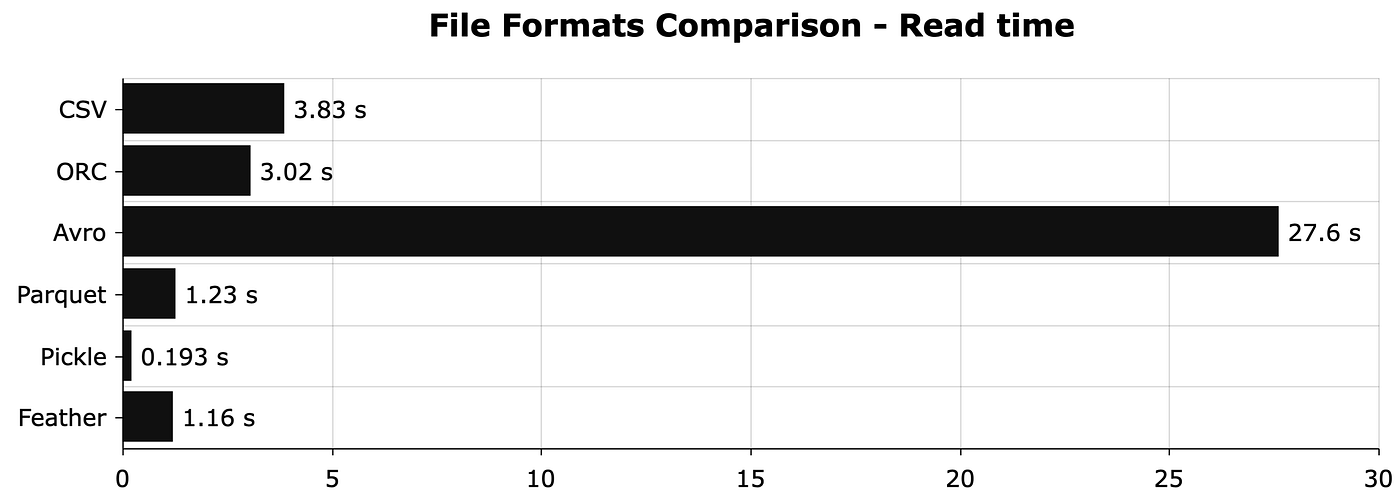
The read time for CSV is not bad but Apache Avro is terrible. Pickle has the fastest read time, so it looks like the most promising option when working only in Python.
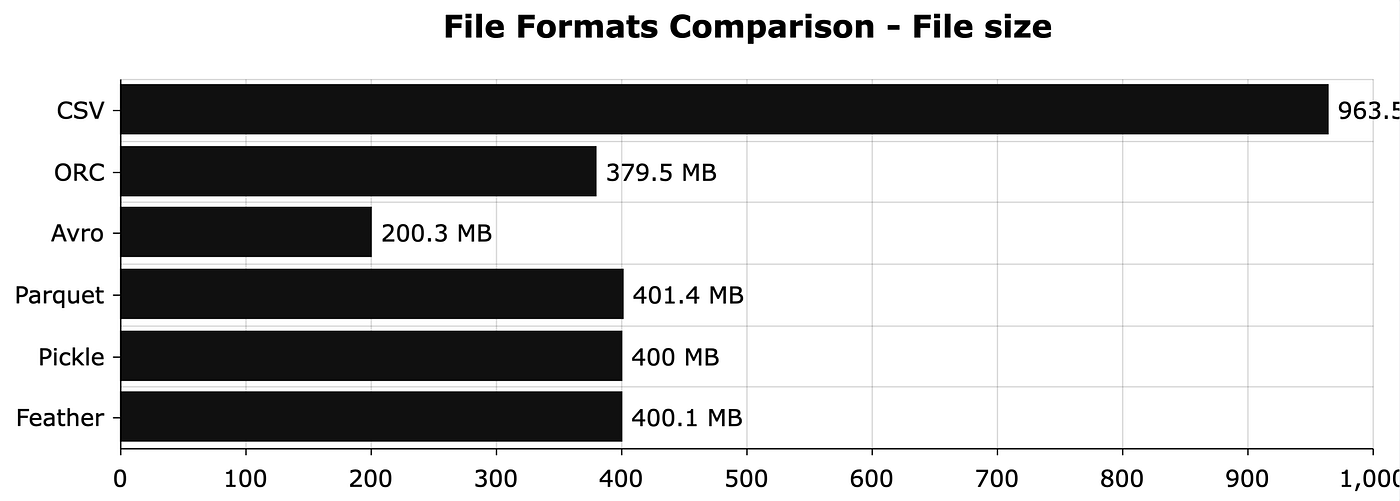
Pretty much any file format has a smaller file size than CSV. The file size reduction ranges from 2.4x to 4.8x, depending on the file format.
### ORC
ORC stands for Optimized Row Columnar which is a data format optimized for reads and writes in Hive.
Since Hive is painfully slow, the developers at Hortonworks decided to develop the ORC file format to improve speed.
In Python, we can use the `read_orc()` function from Pandas to read ORC files. Unfortunately, there is no alternative function for writing ORC files, so we will have to use PyArrow.
```py
# save pandas dataframe to ORC file
table = pa.Table.from_pandas(df, preserve_index=False)
orc.write_table(table, '10M.orc')
# read ORC file to dataframe
df = pd.read_orc('10M.orc')
```
### Avro
Avro is an open-source project that provides services of data serialization and exchange for Apache Hadoop.
Avro stores a JSON-like schema with the data, so the correct data types are known in advance which where the compression happens.
Avro has an API for every major programming language, but it does not support Pandas by default.
### Parquet
Apache Parquet is a data storage format designed for efficiency using the column storage architecture, since it allows you to skip data that isn’t relevant quickly. Therefore, both queries and aggregations are faster which results in hardware savings.
Pandas has full support for Parquet files.
```py
# save dataframe to parquet file
df.to_parquet('10M.parquet')
# read [arquet file to dataframe
df = pd.read_parquet('10M.parquet')
```
### Pickle
We can use the pickle module to serialize objects and save them to a file. We can then deserialize the serialized file to load them back when needed.
Pickle has one major advantage over other formats: we can use it to store any Python object.
One of the most widely used functionalities is saving machine learning models after the training is complete.
The biggest downside is that Pickle is Python-specific, so cross-language support is not guaranteed which could be a deal-breaker for any project requiring data communication between Python and R, for example.
```py
# save dataframe to pickle file
with open('10M.pkl', 'wb') as f:
pickle.dump(df, f)
# load pickle file
with open('10M.pkl', 'rb') as f:
df = pickle.load(f)
```
### Feather
Feather is a data format for storing data frames. It’s designed around a simple premise — to push data frames in and out of memory as efficiently as possible. It was initially designed for fast communication between Python and R, but you’re not limited to this use case.
We can use the feather library to work with Feather files in Python. It’s the fastest available option currently.
```py
# save Pandas DataFrames to Feather file
feather.write_dataframe(df, '10M.feather')
# load Feather file
df = feather.read_dataframe('10M.feather')
```
## References
[1]: [The Best Format to Save Pandas Data](https://towardsdatascience.com/the-best-format-to-save-pandas-data-414dca023e0d)
[2]: [Stop Using CSVs for Storage - Here Are the Top 5 Alternatives](https://towardsdatascience.com/stop-using-csvs-for-storage-here-are-the-top-5-alternatives-e3a7c9018de0)
[3]: [Optimize Python Performance with Better Data Storage](https://medium.com/data-science/)